Your computer starts loading a simple document. You grab a snack. You come back. The screen is still blank. It’s not just slow. It’s compromised.
Spyware is the silent thief in the machine. It slips onto your hard drive without asking for permission. Once inside, it watches. It tracks. It slows everything down to a crawl.
Some estimates suggest over 80 percent of personal computers carry some form of this malicious software. That number is terrifying. It means your device might already be compromised. Before you throw your laptop out a window, let’s look at what is actually happening under the hood.
Зміст
It’s Not a Virus (Even Though They Feel the Same)
People mix up spyware and viruses. They shouldn’t.
A virus is a biological metaphor for code. It replicates. It jumps from host to host. It carries a payload designed to destroy data or break the operating system. It wants to hurt you.
Spyware doesn’t care about destruction. It cares about data. And sales.
Defined broadly, spyware is any program that installs itself without your consent. It hides in the background. It makes unwanted changes to your user experience. The slowness you feel? That’s a side effect. The real goal is to serve you targeted ads or force your browser to display specific sites and search results.
It’s not about breaking your computer. It’s about owning your attention.
Who Gets Targeted?
Right now, the battlefield is Windows. Most spyware strains are built specifically to exploit the Windows operating system. Mac users aren’t entirely safe, but the volume of threats is heavily skewed toward Microsoft’s platform.
Some names have become infamous in the security community:
* Trymedia
* Nuvens
* Estalive
* Hotbar
* New.Net.Domain.Plugin
These aren’t just random errors. They are deliberate intrusions.
How It Gets In
You didn’t click a shady link. You probably didn’t know you installed it.
Spyware often piggybacks on other software. You download a free media player or a file-sharing tool. The installer asks if you want to install “additional helpful tools.” You click “Yes” without reading the fine print. That’s how it happens.
It slips in through the cracks of convenience.
The Legal Gray Area
Is spyware illegal? Usually, yes.
In the United States, the Computer Fraud and Abuse Act (CFAA) and various state laws are designed to combat this unauthorized access. But enforcement is a nightmare.
Tracing spyware back to its originators is incredibly difficult. The software is often distributed through a maze of shell companies and anonymized networks. By the time authorities identify a source, the code has mutated and spread worldwide. The law exists on paper. Catching the bad guys? That’s the hard part.
How to Protect Yourself
You can’t stay vigilant 24/7. But you can set up defenses.
- Use Antivirus Software. Ensure your security suite includes specific spyware scanning features. Standard virus protection isn’t always enough.
- Block Pop-ups. Enable your browser’s pop-up blocker. Many spyware infections begin with a deceptive ad window.
- Read the Fine Print. Be cautious about allowing software installations from the internet. If an installer offers “optional” extras, say no.
The goal isn’t to live in fear. It’s to understand the cost of convenience.
Why do we click “Accept” so easily?
Because we want the software to work. We want the file to download. We don’t want to think about the hidden baggage that comes with it.
But the baggage is heavy. It slows down your machine. It spies on your habits. It sells your data to the highest bidder
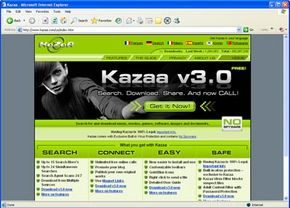

Most of the time, you’re the one handing over the keys. Spyware doesn’t just teleport onto your hard drive. It arrives because of a specific action. A click. A download. A moment of misplaced trust in a pop-up window.
It’s rarely a silent breach. It’s usually a transaction you didn’t fully understand. You install a software package. You agree to add functionality to your web browser. Or you click a button that promised to update your Flash plugin.
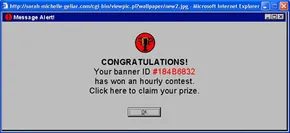
The trickery is what makes it sticky. Developers of these invasive applications don’t just ask for your data. They engineer confusion. They use fake system alert messages that look like critical Windows errors. They design buttons that say “Cancel” but actually trigger the installation. You think you’re stopping the process. You’re starting it.
Here is how that deception typically plays out in the wild:
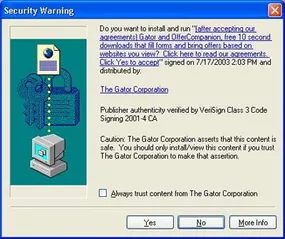

You don’t always have to click anything to get infected. A drive-by download happens when a website or a pop-up window silently attempts to push spyware onto your hard drive. The process is often terrifyingly passive. You might see a standard browser dialog box asking if you want to install the software. If your security settings are dialed down to “low,” you won’t even see that warning. The file installs anyway. The site didn’t ask for permission. It just took it.
Then there is the bundle game. This is piggybacked software installation. It’s common with peer-to-peer clients and those “free” alternatives to expensive tools. You go to install a file-sharing program. The installer asks about the destination folder. It offers a few checkboxes. If you click “Next” without reading the fine print, you’re downloading more than just the app. You get toolbars, adware, and spyware tucked into the package. The vendors know you’re in a hurry. They count on your inattention. There is no such thing as a free lunch, especially in software distribution.
The browser hijacker threat
Add-ons promise to make your browser better. They add toolbars, animated avatars, or extra search boxes. Some do exactly what they advertise. Many don’t. Others are spyware wearing a disguise. The worst offenders are browser hijackers. These don’t just sit in your browser window. They embed themselves deep in the operating system. Changing your homepage? Easy. Redirecting your searches? Standard. Removing them? That requires significant effort. You often have to fight the software just to uninstall it.
Which path is riskiest? The silent drive-by or the conscious choice to ignore checkboxes? Both rely on you not paying attention. The internet rewards vigilance. Or it punishes negligence. You rarely know which one you’ve triggered until it’s too late.

The Fake Defender Trap
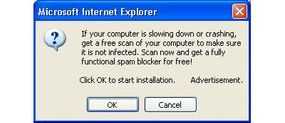
Some software takes deception to a sadistic level. It masquerades as an anti-spyware tool. You download it thinking you are securing your machine. You run the scan. The program reports your system is clean. In reality, it just installed more spyware. This is a known tactic. These fake defenders are often labeled with names like “Snitches” and “Sneaks.” They prey on fear. They profit from confusion.
Real Spies vs. Hacker Tools
Not all malicious code is spyware. Some programs are actual “spies.” They sit silently on your desktop. They intercept personal data. Usernames. Passwords. Sensitive details.
Programs like Bugdrop, Back Orifice, and VX2 fall into this category. They are aggressive. They are more akin to viruses or hacker tools than standard spyware. They breach your system with intent to steal or control.
What Spyware Actually Does
Once installed, spyware changes how your computer behaves.
At its most basic, it runs in the background as soon as you boot up. It hogs RAM. It eats processor power. Your system slows down. Pop-ups appear endlessly. Your web browser becomes sluggish. Eventually, it is unusable.
Some variants reset your home page. Every time you open the browser, you see an ad. Others redirect your web searches. They control the results you see. Your search engine becomes useless.
The damage can be deeper. Spyware can modify the dynamically linked libraries (DLLs) your computer uses to connect to the internet. This causes connectivity failures. These errors are hard to diagnose. You might think you have an ISP issue. You don’t.
At its worst, spyware records everything. It logs your keystrokes. It tracks your browsing history. It captures passwords and private information.
The Hidden Costs
Certain types of spyware modify your internet settings. If you use dial-up service, your modem may dial expensive, pay telephone numbers. You pay the bill. The spyware maker gains nothing directly, but you suffer.
Bad guests don’t just stay and eat your food. They rearrange your furniture. Some spyware changes your firewall settings. It invites in more unwanted software. You are left exposed.
Smart spyware even protects itself. It knows when you try to remove it from the Windows registry. It intercepts your attempts. It fights back.
Why Do They Do It?
The motives behind spyware are not always obvious.
One reason is traffic padding. Advertisers want inflated statistics. If spyware forces your computer to display pop-up ads and fake search results, the ad network claims credit. They can claim they displayed that ad to you repeatedly. If you click an ad by accident, they count it as genuine interest in the product. Fake clicks. Fake value.
Another use is stealing affiliate credits. Major sites like Amazon and eBay offer credits to websites that refer traffic to their product pages. Spyware applications capture your requests to view these sites. Then they take the credit for sending you there. You visit the store. The spyware owner gets the commission. You get nothing but clutter.
Other “Ware”
The landscape of malicious software is broad. Here are the other key terms you should know.
- Malware – a general term for any program that makes changes without your express permission. It does malicious or “bad” things.
- Adware – programs designed specifically to deliver unrequested advertising.
- Stealware – specific spyware designed to capture clicks or website referral credits.
- Browser hijacker – a malicious program that becomes deeply embedded in your browser’s code and core functionality.
The line between these categories is often blurry. A browser hijacker might also be stealware. Adware can turn into malware if it starts stealing data. The tools change. The intent remains the same. Control. Profit. Intrusion.
Installing software without clear consent isn’t just shady business. It’s illegal. State laws like Utah’s Spyware Control Act and California’s Consumer Protection Against Computer Spyware Act explicitly ban these practices. But you don’t need to wait for local legislation. Federal law already has your back.
The Computer Fraud and Abuse Act covers unauthorized installations. Deceptive trade practices violate the Federal Trade Commission Act. And the Electronic Communications Privacy Act protects your personal data from corporate snooping.
Just because it’s illegal doesn’t mean it’s easy to stop.
Enforcement is a nightmare. Perpetrators know this. Hard evidence linking a company to a specific spyware product is scarce. Jurisdiction battles over which court hears the case delay justice for years. The law exists. Stopping the spread? That’s the hard part.
So, how do you protect yourself? And what if you think you’re already infected?
Use a Dedicated Spyware Scanner
Don’t rely solely on traditional antivirus. You need specialized spyware detection tools. Applications like Ad-aware, Spybot, and Microsoft AntiSpyware (currently in beta) are free for personal use. They function like antivirus software but focus on tracking cookies and monitoring active protection. They also reveal which sites the cookies reference.
Finding the malware is step one. Removing it can be tricky. You may need specific instructions for your particular infection. Resources like the Microsoft DLL Help Database and SpywareGuide offer lists of known spyware and removal guides.
Block Pop-Ups Aggressively
Modern browsers have built-in defenses. Internet Explorer 6.0 and Mozilla Firefox 1.0 can block all pop-ups or alert you before one appears. Configure these settings to stay on at all times. You can also whitelist trusted sources if needed.
Pop-ups are the primary delivery method for many infections. Blocking them cuts off the most common attack vector.
Disable Active-X Components
Browsers allow sites to take actions on your machine via Active-X. It’s a powerful feature, but a major security risk. Many spyware applications exploit Active-X code in Windows.
Disable it in your browser’s preferences. Yes, it might break some legitimate websites. But security usually trumps convenience. If a site requires Active-X, ask yourself if you really trust it.
Be Skeptical of New Software Installations
When a site asks you to install something, pause. Is it a plugin you recognize? Flash? QuickTime? Java? If not, reject the installation.
Most modern web functionality happens inside the browser. You rarely need extra components. Test the site without the new software. A trustworthy site will let you download the necessary plugin later if you find you actually need it.
Close Pop-Ups the Right Way
Fake system messages mimic your computer’s alerts. Learn what they look like. Avoid clicking “No thanks” or “Cancel.” These buttons often trigger the installation.
Instead, click the X in the corner of the toolbar. Or use the built-in keyboard shortcut for closing a window. Check your browser’s File menu for the specific key combination. It’s a small habit that prevents accidental installs.
Frequently Asked Questions
How does spyware affect system performance?
It consumes processing power and memory. Expect sluggish behavior, slow load times, and general system lag.
What should I do if my antivirus does not detect spyware?
Standard antivirus software often misses spyware. Use a specialized spyware removal tool instead. Keep your security software updated to catch new threats.
Lots More Information
For deeper dives into spyware removal, check these resources:
- Microsoft DLL Help Database: Download original DLLs to fix corrupted system files.
- SpywareGuide: A comprehensive list of known spyware with specific removal info.
- SpywareInfo: Detailed instructions on removing browser hijackers, a common spyware variant.