



Picture this: You are seated in a conference room in New York, pitching your startup to investors in London. Your lead presenter, Todd, is on the line from San Francisco. You catch a critical error in his argument. You don’t interrupt the call. You don’t risk breaking the flow of the pitch. You simply pull out your BlackBerry, open BlackBerry Messenger (BBM), and type a quick note to Todd’s PIN.
“Todd, tie that back to ROI.”
The response is instantaneous. “Got it. Will do.”
The investors remain unaware of the backstage correction. The presentation moves forward, smoother and more effective. This wasn’t just convenience. It was a tactical advantage.
Or consider the opposite scenario. You are stuck in gridlock traffic on your way to a family reunion. You know you are going to be late, but you don’t want to waste time hunting down phone numbers or guessing which relative might answer. You open BBM. You send a single message to a group thread containing your sister, your dad, and your aunt. You apologize. You give an estimated time of arrival.
Sister replies: “We’re stuck in the same mess. Keep us posted.”
Dad replies: “We’ll wait for you.”
No missed calls. No voicemail tag. Just clarity.
Зміст
The Mechanics of BBM
BlackBerry Messenger was not merely a chat app. It was a protocol built on PIN-to-PIN communication. Unlike email, which routes through servers that can delay delivery or get lost in spam filters, BBM operated over the BlackBerry Infrastructure. This meant messages were delivered with near-zero latency, provided you had a cellular data connection.
For enterprise users, this was a game-changer. It allowed for real-time coordination that traditional mobile voice calls or SMS could not match. SMS was expensive per message and limited in length. Voice calls required both parties to be available simultaneously. BBM allowed for asynchronous yet instant communication.
Key Features That Drove Adoption
The tool offered a suite of features that seemed basic by today’s standards but were revolutionary at the time.
- Multi-Session Chat: You could carry on several conversations at once. Switching between a chat with your spouse and a work group was seamless.
- Group Messaging: Broadcast a single update to multiple contacts simultaneously. This was particularly useful for travel updates or family coordination.
- Presence Status: You could see if a contact was “Available,” “Away,” or “Busy.” This reduced the friction of wondering if someone was ignoring you or just in a meeting.
- File Sharing: Users could send documents and media files directly within the chat interface.
- Message Tracking: You could see if a message had been sent, delivered, and read. This provided a layer of accountability and assurance that communication had occurred.
Advantages and Disadvantages
The popularity of BBM stemmed from its reliability and the strong network effect created by BlackBerry’s corporate user base. However, it was not without flaws.
Advantages:
* Cost-Effective: It used data rather than per-message SMS fees, making it cheaper for heavy users.
* Reliability: The BlackBerry Infrastructure was known for high uptime and secure delivery.
* Enterprise Security: For many companies, BBM was a safer


BlackBerry Messenger (BBM) was designed as a robust communication tool, but its utility comes with specific constraints that set it apart from the flood of other chat applications. If your circle consists primarily of fellow BlackBerry device owners, it remains a formidable asset. The feature set is comprehensive for its time.
You can juggle multiple real-time conversations with friends and colleagues scattered across different locations. Group chats are supported, allowing for broader team coordination. The pricing model is straightforward: unlimited worldwide messaging without per-message fees. This eliminates the anxiety of data overages that plagued early SMS plans. Messages bypass the traditional inbox, reducing clutter while maintaining a dedicated chat stream.
Status visibility is granular. You can see if a contact is online, available, or busy, and you can broadcast your own availability to prevent interruptions. It handles logins and contact management similarly to desktop IM programs. Multitasking is seamless; you can send emails or browse the web while BBM runs in the background. Inviting new contacts is frictionless—you simply add them to your buddy list without needing a separate account setup. For critical contacts, you can assign unique ringtones or vibration patterns, ensuring you never miss an urgent message.
[source: BlackBerry Connection, BlackBerry Messenger User Guide, CrackBerry]
However, the protocol demands strict adherence to BlackBerry’s ecosystem. The most immediate hurdle is the PIN requirement. To message someone, you must know their unique eight-digit alphanumeric PIN code assigned to their device. There is no username search or email lookup to find new friends.
This leads to the more significant limitation: BBM is a walled garden. It does not interoperate with popular instant messaging programs like AIM, MSN, or early Jabber clients. Launched in early 2006 as part of BlackBerry Enterprise Server 4.1, it relies on a fundamentally different architecture.
Most instant messaging services operate on a peer-to-peer model after the initial handshake. You download a client that connects to a provider’s server. The client sends your IP address, port number, and contact list to the server. The server creates a temporary file mapping connections and notifies your contacts of your availability. Once connected, the server steps away. Your device communicates directly with the recipient’s device.
BBM works differently. It functions more like email. The Research in Motion (RIM) servers remain involved in every step of the conversation. All data routes through RIM’s infrastructure. This architecture ensures reliability and encryption but creates a dependency on the network. You cannot use BBM without an active BlackBerry Internet or data plan. There is no offline peer-to-peer fallback.
Getting started requires navigating these constraints. The basic functions are powerful, but they only work within this closed loop. Understanding this architecture explains why BBM felt so secure and reliable to its users, even as it isolated them from the wider IM world.
The Infrastructure Difference
The core distinction lies in how the data flows. Standard IM clients disconnect from the central server once the connection is established. BBM keeps the link active. This means every message passes through the central hub. It adds latency compared to true peer-to-peer systems but guarantees delivery and status updates that are difficult to spoof.
This design choice impacts user experience significantly. You are always “on.” There is no way to go invisible without logging out. The server knows exactly where you are and who you are talking to. For enterprise users, this is a feature. For casual users, it can feel intrusive.
The requirement for a data plan is non-negotiable. Since messages are routed through servers rather than sent directly between devices, they consume data rather than SMS credits. This was a significant shift in how users thought about messaging costs. You weren’t paying per text anymore. You were paying for connectivity.
What You Need to Begin
To use BBM, you need a BlackBerry device capable of running the software. Early models required BlackBerry Enterprise Server 4.1 or later. Consumer devices relied on BlackBerry Internet Service. The PIN code is your identity. You cannot register with an email address. You must exchange PINs manually to initiate contact.
This manual exchange creates a high-barrier entry point. You cannot find BBM users by searching. You have to meet them in person or exchange codes through another channel. This contributed to its cult-like following. The people on your list were people you knew.
The interface mirrors desktop IM programs but is optimized for the BlackBerry keyboard. Navigation is tactile. You use the trackball or trackpad to scroll through chat histories and status lists. The lack of a full QWERTY keyboard on some models made typing longer messages cumbersome, but the predictive text and shortcut keys mitigated this for many users.
The system allows for multiple simultaneous chats. You can switch between conversations instantly. This multitasking capability was a major


You don’t need a manual for BBM. It’s already on the newer BlackBerrys, sitting right there in the menu. But if you’re holding onto an older model? You have to hunt it down. It’s a bit of a hunt, but once you’ve got the software, the setup is practically invisible.
To get this running, you need a Java-capable BlackBerry. That’s the hardware baseline. Then you need a data plan—specifically a BlackBerry Internet service plan. You can’t just wing it with standard text; you need the pipe open for PIN-to-PIN messages through RIM’s servers. And you need your PIN. It’s unique to every device. Find it by digging into Options, then Status, then PIN. It’s a long string of letters and numbers. Memorize it. Or write it down. Don’t lose it.
Installing the Software
If the app isn’t already there, you’re downloading it. Head to blackberry.com/messenger via your browser. If you’re on a desktop, you’ll need BlackBerry Device Software v3.6 or higher. Simple enough.
Doing it directly on the phone? You’ll need v3.7 at least. And you need space. A minimum of 16 MB of flash memory is the hard requirement. If you’re short on space, clear out some old files. The app won’t budge into the device without that room.
Once installed, the login is automatic. The first time, though, you’re forced to create a display name and a password. This is your identity in the chat rooms of the world. After that, you’re in. Connect to the wireless network, and you’re logged on. Build your list. Send messages. It’s that linear.
Adding Contacts
The contact list is divided. You have individual contacts and groups. But you can’t just start talking to anyone. You have to invite them. They have to say yes. It’s a barrier to entry that keeps the spam out, mostly.
For people already in your address book:
1. Open the BBM menu.
2. Select Add a Contact.
3. Pick the name.
4. Click Request.
For strangers? You have to dig deeper.
1. Go to the Contact List screen.
2. Hit Add a Contact.
3. Scroll to the very top.
4. Highlight Use Once.
5. Select Request by E-mail or PIN.
6. Type the address or code.
7. Hit Enter.
8. Add a note. Click OK twice.
When they accept, they pop into your list. If they send you an invite, it shows up on that same screen. Click it. Click the trackwheel. Click Open, then Accept. Or Decline. Your call.
Sending and Receiving Messages
Click a name. Click Start Conversation. Type. Hit Enter. Done.
Want to jump into an existing chat? Go to the Existing Conversations list. Click the name. Click Open Conversation. It’s like walking into a room where people are already talking.
Need more people? During a chat, click the trackwheel. Select Invite. Add them to the mix. Want to leave? Click the trackwheel again. End Conversation.
Once you’re comfortable with the basics, you can tweak settings. Manage groups. Change your status. Set alerts. But first, you need to understand the lingo. It’s not just slang. It’s functionality.
Pin and Ping Lingo
They sound the same. They mean different things.
PIN is the hardware ID. It’s the key to the door. You need it to send a message to someone directly. Not their email. Not their number. Their PIN.
Ping is an action. It’s a vibration. When you ping someone, their BlackBerry buzzes. Instantly. It’s a way of saying, “Hey, look at your screen.” You might say, “Send me your PIN. I’ll ping you at 3 p.m.” It’s urgent. It’s attention-grabbing. It’s the difference between sending a letter and knocking on a door.

Organizing the Address Book
Getting a handle on your contacts is the first step. If you need to check specific details, the path is straightforward: navigate to the Contact List, tap the name, and select Contact Info.
Want to purge the list? It’s just as simple. Select the contact, hit Delete Contact, and confirm with Delete.
But individual management is only half the story. BlackBerry Messenger allows you to cluster people into groups, which is arguably more useful for filtering noise than organizing names. Here is the mechanics of group handling:
- Create a group: In the Contact List, choose Add Group. Enter a name and hit OK.
- Reassign a contact: Select the person, click Move, pick the target group, and confirm.
- Delete a group: Tap the group name, select Delete Group, then Delete.
A hard constraint here: you cannot delete the default Contacts group. It’s locked in.
Controlling Visibility and Status
Your presence status is how others perceive your availability. It dictates whether you are open to instant messaging or fully off the grid. The system is automated in many cases. If you switch apps or fail to reply within two minutes, the status flips to Busy. If you are actively using the phone or in a dead zone, it shows as Unreachable.
You have manual override, too. Go to the Contact List, toggle between Available and Unavailable, and type a custom status message.
There is a significant functional difference between the two states. If you set yourself to Unavailable, messages still arrive on the device. They just won’t trigger a notification. You see them when you check, but you won’t be interrupted.
Alerts and the “Ping” Feature
Notifications are configurable via your profile. Navigate to the Profiles list, select your active profile, and click Edit. Look for Messenger — New Message, click Edit, and set your preference—such as Vibrate-Tone —along with volume levels. Save with the trackwheel.
There is also a specific feature called Ping. If someone is ignoring you, you can force their device to vibrate. In BlackBerry Messenger, press the trackwheel, select Ping Contact.
If you want to opt out of receiving these pings, go to the Contact List, open Options, and check the box for Clear the Vibrate When Receiving a Ping.
Hidden Utilities
Beyond the basic chat functions, there are utility shortcuts buried in the interface:
- Emoticons: Press the SYM key twice to open a selection of emoticons for your messages.
- Calendar: Select View Calendar to check your schedule without exiting the messenger app.
- Copy History: This saves a text copy of your conversation. It is only available before you hit End Conversation. Once the chat closes, that option vanishes. You miss the save window, you lose the record.
BlackBerry Messenger works well for the BlackBerry ecosystem. But if you need to message people on other platforms, the built-in tools don’t cut it. We’ll look at what your options are for cross-platform communication next.
Alternative Messaging Options for BlackBerry Devices
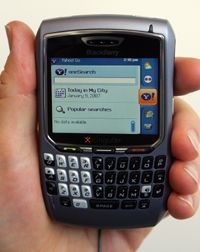

BlackBerry Messenger (BBM) kept you connected with your own network, but it left you stranded when chatting with non-BlackBerry users. You weren’t stuck in a silo. You had options. The device supported major instant messaging platforms, allowing you to bring your existing digital life to your mobile screen.
Dedicated App Alternatives
Most big players provided native applications for the platform. If you already used one of these services on your desktop, extending it to your BlackBerry offered immediate mobile availability. You could access your contact lists and send messages from the go.
The primary services included:
- Yahoo Messenger
- Google Talk
- Windows Live Messenger
- AOL Instant Messenger
- ICQ for BlackBerry
- IBM Lotus Sametime
- Novell GroupWise Messenger
Installation was straightforward. You downloaded the application directly to the device or transferred it from your computer. However, availability wasn’t universal. You had to check with your wireless provider to see which networks were actually supported in your area.
The trade-off was clear. You could only chat with others who used that specific service. If your colleague still preferred a different platform, you were out of luck. This fragmentation created friction in business communications.
Aggregators for Unified Messaging
To solve the fragmentation problem, some services offered multi-provider messaging. These aggregators let you log into multiple networks simultaneously. Three notable options emerged for BlackBerry users: JiveTalk, EQO, and WebMessenger.
They weren’t all free.
JiveTalk charged for its service but provided robust connections. It linked AIM, Yahoo, MSN, Google Talk, ICQ, Jabber, and MySpace IM. A non-transferable license for a single BlackBerry device cost $19.95. This included free software upgrades. But if you switched to a new BlackBerry, you needed another license. A $29.95 user license was transferable, offering more flexibility.
EQO took a different approach. Free IMing was available for connections to MSN, AIM, Yahoo!, Google Talk, QQ, ICQ, and Jabber. The company made money by charging for text messaging and VoIP calling features. This model appealed to users who wanted basic chat without fees but were willing to pay for premium voice or SMS capabilities.
WebMessenger offered a hosted solution. You could access AOL, MSN, Yahoo, Google Talk, ICQ, and Jabber networks from a BlackBerry or other mobile device. While they offered monthly or yearly subscriptions, the WebMessenger Business-Class Service remained free. This made it a viable option for organizations looking to standardize communication without significant upfront costs.
The Evolving Landscape
More instant messaging options continued to appear as technology evolved. IMing became a widely used business tool, driving demand for better integration. For the latest offerings, checking the BlackBerry website was essential. The ecosystem was shifting rapidly.
For more details on BlackBerry Messenger and related topics, helpful links were available on subsequent pages. These resources covered how BlackBerries worked, how smartphones functioned, and the mechanics of instant messaging, SMS, and email. Additional links provided deeper dives into Yahoo Messenger, AOL Instant Messenger, Research in Motion, and community hubs like CrackBerry.


