


WampServer is more than just a tool. This is basic food. Designed specifically for Windows, it combines the heavy lifting of local web development into one package. Get Apache. MySQL (or MariaDB in newer versions) is available. Get PHP. All this works on my machine. This setup mimics a real production environment without the cost and complexity of remote hosting.
For developers, this means that testing is done locally. You can build, destroy and fix everything before a single line of code reaches the public server. It’s safer. Faster. Free for students and freelancers.
Зміст
How WampServer simplifies local web development
The magic is in the integration. Instead of configuring Apache, MySQL, and PHP separately (each of which can be a headache), you get a unified stack. This is where WampServer shines as a perfect solution for Windows-based development.
“WampServer allows users to develop, test and deploy local websites without a remote server.”
Adding phpMyAdmin changes the database management environment. Most developers don’t need to type SQL commands into a black command prompt every time they need to adjust a table. phpMyAdmin offers a web-based user interface. Click to edit and save. It lowers the barrier to entry for new command line tools.
Centralization covers the entire life cycle. From writing server-side logic to optimizing database queries, everything is on your desktop. This is an obvious choice for anyone seriously interested in web development on PC.
Who should use WampServer and why it matters
Flexibility is its greatest asset. WampServer does not lock users to a specific PHP version. You can switch between versions easily. Do you want to maintain old projects with PHP 7.4? You can. Are you ready to test the new features of PHP 8.2? Just switch.
This modular approach prevents vendors from locking into specific software versions. It also helps to anticipate migration problems. If you know that your old code will not survive the transition to modern PHP, you can test the code on its own.
This is not just for experts. A thriving community means the answer is never far away. Whether you’re a student learning the ropes or a QA expert, our ecosystem supports you. The user interface is very intuitive. Dashboards manage services like Apache and MySQL with simple clicks. You can view logs and edit configuration files without exploring the folder structure.
Windows installation and configuration guide
Getting started is very easy. The software is open source and free. You can download it from the official website or trusted repositories like Futura. This applies to both personal and professional use. These versions are regularly updated to comply with current network standards and security patches.
Windows installer is pretty straightforward. In a good way. We will guide you through the steps. Select a directory. Let’s install it. If you need specific PHP modules or paths, you can specify them during installation using the installer. Supports Windows 7-11. Both 32-bit and 64-bit systems are covered. This covers almost all office computers and personal laptops.
There are important limitations. WampServer is Windows only. If you’re using macOS or Linux, you’re not out of luck. Mac users should check out MAMP. Linux users usually use the LAMP stack. This specialty makes WampServer essential for PC users, but irrelevant for others.
Manage updates and backups securely
Keeping WampServer up to date is easy. You can install patches or replace modules in the installation directory. But don’t rush.
Back up your database and configuration files before doing anything. Data loss due to failed updates is an avoidable nightmare. If you need to restore, you can download older versions using WampServer. This is necessary to maintain projects that have not been migrated to new versions of PHP or MySQL.
The dashboard provides easy access to these services. Do I need to restart Apache? Click. Want to check the error log? One click away. Designed for speed. You don’t need to use your own tools to get the job done.
Is this the only way to develop locally on Windows? No. But for those who want everything ready out of the box, this is the most unified package. Its balance of functionality and ease of use has kept it relevant years after it reached the peak of its popularity.
What happens when your project grows beyond a simple local stack? WampServer may be starting to reach its limits. But it’s still the engine under the hood in 90% of small and medium sized projects.
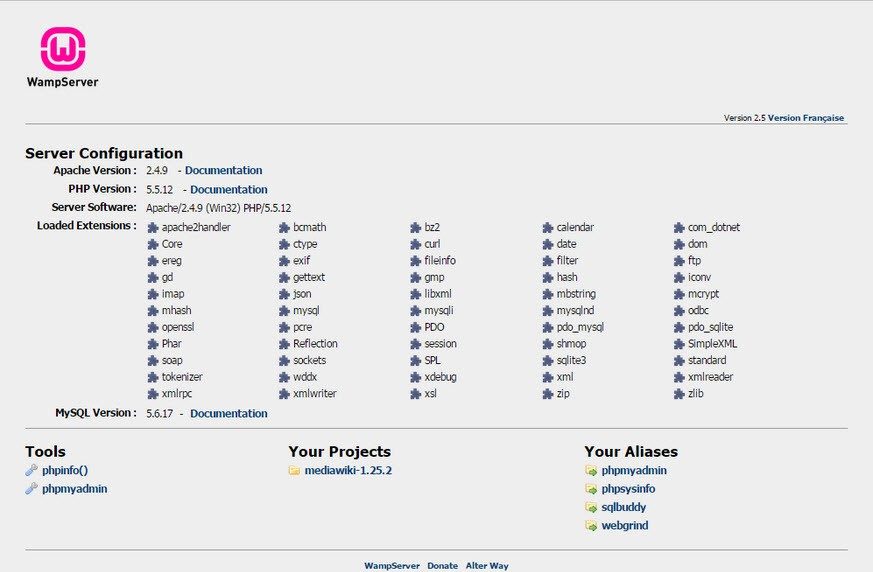

If you’re building a local development environment for Windows, WampServer isn’t just an option. This is a concrete choice. It stands out for its focus on the Windows ecosystem. You may be familiar with XAMPP and MAMP. These provide cross-platform support. WampServer does not. It stays in Windows. This expertise is important.
XAMPP comes with additional tools such as FileZilla FTP server and Mercury mail server. MAMP primarily caters to macOS users who want to run Apache and MySQL properly on Apple hardware. WampServer chooses another path. We prioritize simplicity. Installation is very easy. Setting it up is not that difficult. Once you get familiar with the Windows shell, managing modules feels easy.
Free benefits and community support
WampServer is free. There is no license fee. You don’t have to pay a penny to get all the features. This makes it ideal for personal projects and educational environments. It is open source. So the community builds it. You can participate. You can also trust others.
If things go wrong, you’re not alone. Official documentation already exists. There are many forums dedicated to WampServer issues. This support structure lowers the barrier to entry. Developers can start working without worrying about hidden costs.
Learning resources and certifications
Getting started with WampServer requires more than just downloading the installer. There are plenty of educational resources. The official instructions can be found here. The video tutorials cover almost all the nuances. Professional platforms offer online certification.
These courses go beyond basic settings. They teach server management. Learn database management. Emphasis on safe practices. Resource optimization is an important topic. This educational aspect is in line with WampServer’s open access philosophy. Promote continuous learning.
Version compatibility and hardware flexibility
The main advantage is compatibility. WampServer works on several versions of Windows. Supports 32-bit and 64-bit systems. Works with Windows 7 – Windows 11 operating systems. Older devices can also be used. You are not tied to the latest specifications.
Component consistency is maintained between updates. This ensures the stability of your local development environment. Over time, these tools work together. You will not face major ongoing changes.
Security: Verify local server
Security is often overlooked in on-site environments. That can’t be true. User rights must be managed carefully. Secure phpMyAdmin. This is a common goal. Configure Apache to prevent accidental exposure.
Restrict access to trusted IP addresses. This may mean tweaking configuration files. Limit the ports the server listens on. Regular backups are non-negotiable. Keep your modules up to date. A healthy environment depends on these habits.
Manage old projects and future updates
Sometimes you just have to get over it. Older projects may require an older version of WampServer. Official archives make this possible. You can download old modules. However, you need to plan your move. Please upgrade to the latest version as soon as possible.
The new version has improved performance. Improves security. Network languages and protocols are evolving rapidly. Persistence requires constant vigilance. Choosing WampServer means committing to this development. Stay compliant with web standards.
The situation on the local server has changed. New tools are coming. But for many people, WampServer is still the way to go. It doesn’t apply to everyone. If you want the flexibility of different platforms, look elsewhere. Ideal if you use Windows and want simplicity. The question remains how well it can compete with more modern container solutions. So far, it has maintained its position.

Building a local development environment for WampServer
You don’t need a remote server to test PHP code. WampServer combines Apache, PHP and MySQL (or MariaDB) into one package. Works on Windows. The goal is simple. Recreate the production environment on your own machine. This eliminates dependence on remote infrastructure for day-to-day development and functional testing.
The stack is built on proven components. Apache handles HTTP and HTTPS requests. PHP handles server-side logic. Data is stored in MySQL or MariaDB. You can manage your database directly from the browser using phpMyAdmin. This interface simplifies schema creation, import and export, and performance monitoring.
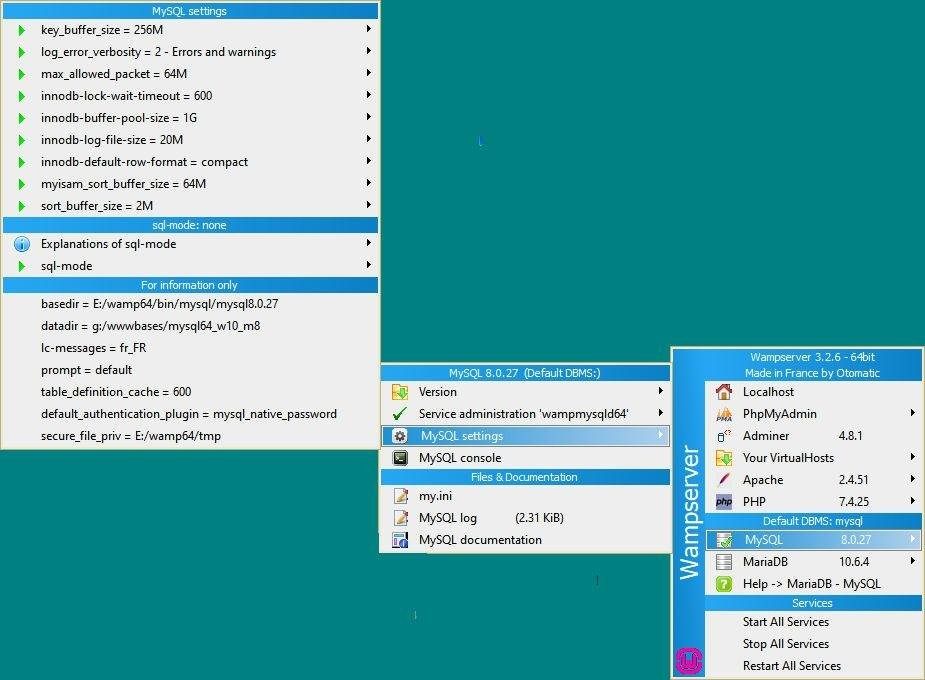
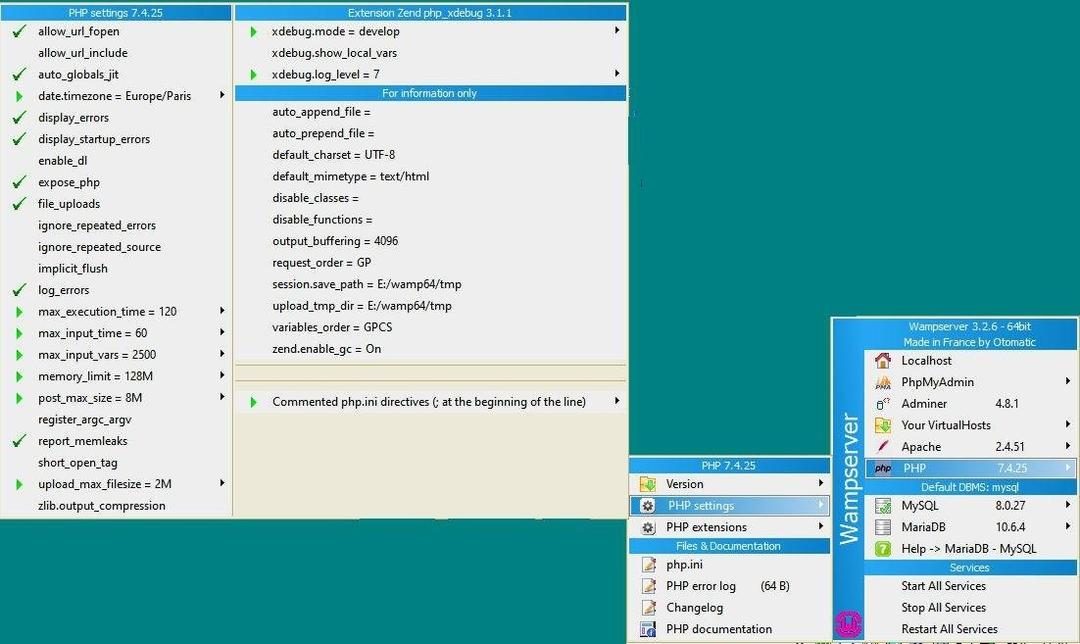
WampServer enables services to be started, stopped or restarted from the Windows taskbar dashboard. You can also change the PHP version and edit configuration files without leaving the user interface.
Configuration and version control
The installation process is easy. This describes a standard Windows installation. When the installation is complete, the default environment is localhost. HTTP, HTTPS and SQL web ports are configurable. This flexibility is important when you use multiple services or have certain network limitations.
You are not tied to a specific PHP version. This tool supports multiple versions. You can switch between them as needed. This is important when testing old applications or introducing new syntax. You can also use configuration files. Edit php.ini, httpd.conf, my.ini and virtual hosts directly. These files control the operation of the local site.
System Requirements and Compatibility
WampServer is free and open source. Can be expanded with modules. You can add plugins to suit your project. This software is available for Windows 7, 8, 10 and 11 operating systems. Supports 32-bit and 64-bit architectures. A standard PC with system administrator rights is required. Internet connection is not required for local use. You only need it to download plugins or check documents.
The user interface is multilingual. French and English are the main choices. The dashboard is integrated into the Windows notification area. This way you can always see status checks without cluttering your workspace. Suitable for the workflow of students, developers and web integrators.
Who uses this localhost stack?
This tool is suitable for multiple users. For beginners, the installation wizard is less intimidating. Experienced integrators appreciate its modularity and version control. Suitable for websites with a simple display. It also supports dynamic applications with complex database interactions.
First, download the executable for your Windows architecture. Run the installer. Follow the instructions. All that remains is the settings. You now have a complete WAMP environment. Before deployment, connection to the outside world is optional.
Why this is important for daily development
Local testing prevents real-time errors. Save time. Catch problems before they go into production. Integration with phpMyAdmin eliminates the need for an external database client. It’s all in your browser. You can control it using the taskbar icon. Start. Stop. Restart. It’s that simple.
Not trusting the internet during development is a feature, not a bug. It makes your work isolating. Consistency is ensured. We’re building a stable, well-documented stack. Apache, PHP and MySQL have been industry standards for many years. WampServer makes management easy on Windows.
This is a trade-off. Only available on Windows. If you work on Linux or macOS, you need another tool. But it’s still a viable option for those in the Microsoft ecosystem. The community is huge. The documentation is extensive. Errors are usually logged. You are not the only troubleshooter.
The environment is in place. The code is localhost. Access the database. The next step is to create the application. Or fix something you inherited. The stack does the heavy lifting. You master logic. This is division of labor. It works because it’s predictable. Predictability is good in software delivery.
Finally, you push it to your live server. The conversion may require configurations. However, the core stack remains the same. Familiarity pays. You probably know how Apache handles requests. You probably know how PHP handles data. You know how MySQL stores it. Local testing reflects reality. Or at least attempting to.
The color of the taskbar icon changes. Green means running. Orange indicates partial load. Red means stop. This is a visual cue. Please take a look. Status is displayed. Keep coding. This cycle repeats itself. It’s everyday. This works. This is how web development works on Windows.

The hidden costs of open source
We tend to think that free software means free development. This is a dangerous assumption. The code may be free, but the effort behind it is not. Maintainers spend thousands of hours fixing bugs, updating dependencies, and responding to security advisories. They do this mostly with good intentions. Good intentions come to an end.
The rise of commercial open source has more to do with survival than greed. Companies can’t give away their best engineers’ time for free forever. When a large library stops receiving updates, the entire ecosystem is shaken. This is not just a problem with damaged packages. This is a breach of trust in the entire foundation.
Why dependency trees are weak
You probably use dozens of open source components in your current project. Maybe there are more. You might not even recognize half of it. This is supply chain risk. One vulnerable package can expose your entire application.
Consider log4j events. This was not a large-scale, sophisticated hack. This is a simple logging library. Because of its universality, its influence spreads throughout the world. This can affect all servers, all cloud instances and all edge devices. Repairs cannot be made immediately. Millions of systems need to be repaired.
Because of this vulnerability, up-to-date tools are very important. You need to know what you are presenting. You can’t just rely on the README file. You need to check your commit hilayer. You should check the final release date. If your software package hasn’t been updated in two years, ask yourself why.
Switching to a commercial license
Some projects have changed licenses. They are moving from permissive licenses to stricter licenses. This does not happen in a vacuum. This is a response to cloud service providers who use open source code to build profitable services without giving anything in return.
The conversation continues. Is it fair for companies to sell services built on code they didn’t write? Or is it fair to charge maintenance personnel by time? There is no easy answer. But the trend is clear. We expect to see more “source available” licenses. These are not fully open source. These are allowed for internal purposes. Resale is limited.
This change affects the purchase of software. You should read the license agreement. Please really read it. It is a mistake to think that MIT or Apache 2.0 is about everything. Some projects require a commercial license for use in production environments. If you ignore this, you not only risk making mistakes; At risk of legal action.
How to protect your stack
Let’s start with visualization. You can’t fix what you can’t see. Find dependencies with automated tools. Find known vulnerabilities. But don’t stop there.
- Pin the version. Prevent your package manager from automatically updating to smaller versions that can cause breaking changes.
- Test the updates one by one. Run a test suite against new dependencies before going into production.
- Join the community. If the project seems abandoned, consider abandoning it. Or make a donation. If the administrator offers support, a fee is charged.
The goal is not to avoid open source. Just respect it. Think of it as a partner, not a vending machine. Recognizing the human work behind the code builds more sustainable systems. This flexibility will pay off the next time a major vulnerability occurs.
Which packages does it depend on?


