当您滚动浏览源或单击电子表格时,您可能不会想到电缆。 但鼠标与计算机的连接方式比您想象的更重要。 它决定了兼容性、即插即用的便利性,以及您是否可以在现代笔记本电脑上使用它而无需寻找适配器。
Зміст
USB standard
Most mice on the market use a USB connector. This is the industry standard for connecting peripherals to a computer. This is the same port used by printers, digital cameras, keyboards, and external drives. If your mouse has a USB connector, it might work as soon as you plug it in. The Universal Serial Bus (USB) protocol handles power and data transfer, making it the default choice for modern devices.
Legacy PS/2 interface
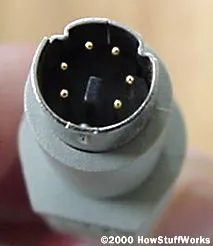
Not all mice are new. Many older models are still in use, often because they were durable or simply because users have not yet upgraded. These mice usually have a PS/2 connector. This is a small round purple (sometimes green) plug that plugs directly into a separate port on the motherboard. Although the PS/2 interface is older than USB, it is still valid. It often offers a direct connection without drivers, so some gamers and industrial users still like its reliability and low latency.
Serial connection
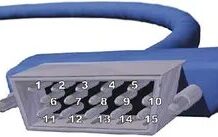
Some other old mice also use a serial connector. These are rare today, but were common in the 1990s and early 2000s. Serial ports are rectangular and usually black. Since data is transferred one bit at a time, it is slower than USB parallel packet switching. If you can find a mouse with a serial port, you may need a special cable or adapter to connect it to modern computers that don’t have a built-in serial port.
Why It Matters
Choosing the right connection type requires more than just fitting the plug. This is to ensure that the hardware will work with your system. USB mice are versatile and widely supported. PS/2 mice provide a separate, interference-free connection, but require specific motherboard ports. Serial mice are mostly outdated and require a lot of effort to adapt to modern setups.
If you want to upgrading your setup, first check the available ports on your computer. A USB mouse is the safest option when considering compatibility. If you have an older mouse, check the connector type. PS/2 requires a corresponding circular port. Serial requires an old adapter. USB requires an empty rectangular slot. Save time in the shop and installation by adding simple but important details.